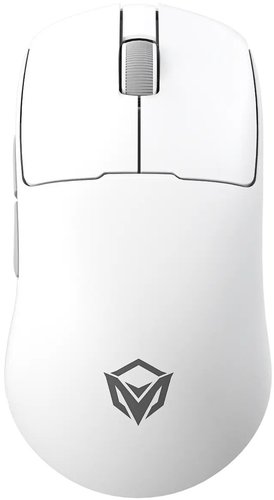
Mouse wireless/wired Meetion GW40 Pro [GW40 Pro White] white

#9439962

Mouse wireless/wired Meetion GW40 Pro [GW40 Pro White] white

[26000 DPI, LED, Bluetooth, USB Type-A, buttons - 5, included: 1 pcs] details

390 000 UZS
Buy
Avail in 2 shops
  • Characteristics
  • Feedback 0
  • Instructions and files

Characteristics Mouse wireless/wired Meetion GW40 Pro [GW40 Pro White] white

General characteristics

Type
mouse
Model
Meetion GW40 Pro
Manufacturer Code
[GW40 Pro White]

Appearance

Main Color
white
Extra Color
gray
Backlight
none
Fabric Cable Braiding
none
Styling
none
Vertical Mouse
none

Control

Total Number of Buttons
5
Extra Buttons
side forward/backward
Custom Button Binds
none
Inertial Scrolling
none
Silent Buttons
none

Sensor

Max Sensor Resolution
26000 DPI
Sensor Type
LED
Sensor Model
PixArt PAW3395
Polling Rate
1000 Hz, 125 Hz
Speed
650 IPS
Sensor Operating Modes
26000 DPI, 7200 DPI, 800 DPI

Design

Housing Material
plastic
Finish
matte plastic
Grip
for the right hand
Mouse Shape
symmetrical
Weight Adjustable
none

Connection

Wireless Connection
yes
Wired Connection
yes
PC Wired Connection Port
USB Type-A
Mouse Wired Connection Port
USB Type-C
Wireless Connection Type
radio channel, Bluetooth
Dongle (Receiver) Connector
USB Type-A
Wireless Range
10 m
Multi-Device Operation
yes

Power

Power Supply
wired, battery
Charging Station Included
none
Mouse Battery Life
up to 30 hours

Additional Information

Package Contents
USB Type-A - USB Type-C cable, documentation, USB receiver
Quantity Included
1 pcs

Dimensions and Weight

Length
119 mm
Width
63 mm
Height
38 mm
Weight
39 g

Description

Беспроводная мышь Meetion GW40 Pro White предназначена для компьютерных игр и повседневной работы. Отсутствие кабеля обеспечивает свободу перемещения и помогает поддерживать порядок на рабочем столе. Мышь подходит для управления курсором, работы с приложениями и навигации по интерфейсу. Белое исполнение позволяет сочетать её с другой периферией в светлых тонах. Устройство можно использовать дома или на игровом рабочем месте. Перед подключением рекомендуется проверить совместимость с используемым компьютером.