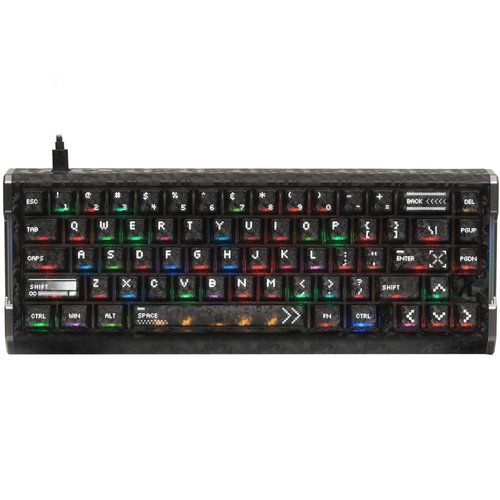
Keyboard  wired Attack Shark R68 HE InkShade

#9351291

Keyboard wired Attack Shark R68 HE InkShade

[magnetic, number of keys - 66, USB Type-A, color black, included: 1 pcs] details

Not on sale
Color
  • Characteristics
  • Feedback 19
  • Instructions and files

Characteristics Keyboard wired Attack Shark R68 HE InkShade

Classification

Type
keyboard
Model
Attack Shark R68 HE InkShade
Manufacturer Code
[ASR68HEInkShade]
Keyboard Type
magnetic

Appearance

Main Color
black
Extra Color
gray, white
Keyboard Layout Language
English
Low-Profile Keys
none
Keyboard Backlight
RGB
Character Layout
front side
Backlit
around the keyboard, by keycap area

Switches

Stroke Length
3.4 mm
Actuation Distance
0.1 mm
Switch lifespan (in million keystrokes)
100
Key Actuation Force
45 G

Keys

Total Number of Keys
66
Keycap Material
ABS
Double Shot
none
Round keys
none
Extra Keys
0 pcs
Silent Keys
none

Functionality

Display
none
Numeric Keypad
none
Scroll Wheel
none
Function Key (Fn)
yes
Keyboard Layout
ANSI
Custom Key Binds
none
MAC OS Support
yes

Design

Structural Features
classic
Housing Material
plastic
Water Resistant
none
Wrist Rest
none
Phone stand
none
Hot Swap
yes
Keypad Layout
60%
Noise Insulation
yes

Connection and Interfaces

Connection Type
wired
Connection Type
USB Type-A
Max Polling Rate
8000 Hz
Fabric Cable Braiding
none
Multi-Device Operation
none

Additional Information

Power Supply Type
wired
Package Contents
USB Type-A - USB Type-C cable, additional keycaps, documentation, puller
Quantity Included
1 pcs

Description

The Attack Shark R68 HE InkShade wired keyboard is housed in a black body with a sound-dampened structure. Magnetic linear switches with a lifespan of 100 million keystrokes provide precise, smooth control. The Rapid Trigger function offers dynamic reset point adjustment from 0.1 to 3.4 mm. The Hot Swap system simplifies switch replacement.
The Attack Shark R68 HE InkShade keyboard is equipped with multi-color RGB backlighting. Using the Web Driver software, you can customize key functions, create macros, and program light effects and illumination schemes. The keyboard connects to a computer via cable using a USB Type-A connector.